Elementary OS :
https://drive.google.com/file/d/19iWAelxEWWT53AtH0SNdCbvj0oZrPi24/view?usp=sharing
Putty :
https://drive.google.com/open?id=1tK-t0XvqijCub1j8Cmn9bQw0kjU1Ypoy
nfdump :
https://drive.google.com/open?id=143IOux8ktdUCavhZvVCEphgw1peQdTrx
Mikrotik ISO :
https://drive.google.com/open?id=1RaLq3Q1TF32CXBVORxaDOHei2ErQyQp_
CCPROXY :
https://drive.google.com/open?id=1r1dPRUVLvLvvkRD4uQ8v0jF2YoKJGwmb
NetPerSec :
https://drive.google.com/open?id=1RRZRN_AHWCBXasw25dQgiis-zUhLMcgH
Winbox :
https://drive.google.com/open?id=1Bc81JilsVOWx8QvX3FG9Ze5tCOU_eXaP
Btest Winbox for Windows :
https://drive.google.com/open?id=1M3ld6D10Ovvj-5v0Q56-erFPUP6-UPZT
Xshel Netsarang ver 5 :
https://drive.google.com/open?id=1wLD05nu7ALQcFX-_csjXIimRvKjylAjg
Wednesday, July 4, 2018

Tuesday, July 3, 2018
Install NFSEN & NFDUMP on Ubuntu 16.04
install depedency :
apt install make gcc flex rrdtool librrd-dev libpcap-dev php librrds-perl libsocket6-perl apache2 libapache2-mod-php7.0
install nfdump :
masuk ke folder nfdump >
./configure --enable-nsel --enable-nfprofile --enable-sflow --enable-readpcap --enable-nfpcapd
make
make install
nfdump -V
cd ../nfsen-1.3.8
cpan App::cpanminus
cpann Mail::Header
cpann Mail::Internet
nano ./etc/nfsen-dist.conf
>
# user and group of the web server process
# All netflow processing will be done with this user
$WWWUSER = "www-data";
$WWWGROUP = "www-data";
# number of nfprofile processes to spawn during the profiling phase
# depends on how busy your system is and how many CPUs you have
# on very busy systems increase it to a higher value
#$PROFILERS = 2;
useradd -M -s /bin/false -G www-data netflow
mkdir -p /data/nfsen
./install.pl ./etc/nfsen-dist.conf
nano /etc/apache2/sites-enabled/000-default.conf
>
<VirtualHost *:80>
# The ServerName directive sets the request scheme, hostname and port that
# the server uses to identify itself. This is used when creating
# redirection URLs. In the context of virtual hosts, the ServerName
# specifies what hostname must appear in the request's Host: header to
# match this virtual host. For the default virtual host (this file) this
# value is not decisive as it is used as a last resort host regardless.
# However, you must set it for any further virtual host explicitly.
#ServerName www.example.com
ServerAdmin webmaster@localhost
DocumentRoot /var/www/nfsen
DirectoryIndex nfsen.php
service apache2 restart
/data/nfsen/bin/nfsen start
#############################################
Testing >>> on Mikrotik
nano /data/nfsen/etc/nfsen.conf
%sources = (
'MIKROTIK NOC' => { 'port' => '2055', 'col' => '#00ff00', 'type' => 'netflow' },
# 'upstream1' => { 'port' => '9995', 'col' => '#0000ff', 'type' => 'netflow' },
# 'peer1' => { 'port' => '9996', 'IP' => '172.16.17.18' },
# 'peer2' => { 'port' => '9996', 'IP' => '172.16.17.19' },
);
/etc/init.d/nfsen reconfig
Ref :
https://www.youtube.com/watch?v=rge1mBvzj5E
https://www.youtube.com/watch?v=Lfrvjbc_QtA
apt install make gcc flex rrdtool librrd-dev libpcap-dev php librrds-perl libsocket6-perl apache2 libapache2-mod-php7.0
install nfdump :
masuk ke folder nfdump >
./configure --enable-nsel --enable-nfprofile --enable-sflow --enable-readpcap --enable-nfpcapd
make
make install
nfdump -V
cd ../nfsen-1.3.8
cpan App::cpanminus
cpann Mail::Header
cpann Mail::Internet
nano ./etc/nfsen-dist.conf
>
# user and group of the web server process
# All netflow processing will be done with this user
$WWWUSER = "www-data";
$WWWGROUP = "www-data";
# number of nfprofile processes to spawn during the profiling phase
# depends on how busy your system is and how many CPUs you have
# on very busy systems increase it to a higher value
#$PROFILERS = 2;
useradd -M -s /bin/false -G www-data netflow
mkdir -p /data/nfsen
./install.pl ./etc/nfsen-dist.conf
nano /etc/apache2/sites-enabled/000-default.conf
>
<VirtualHost *:80>
# The ServerName directive sets the request scheme, hostname and port that
# the server uses to identify itself. This is used when creating
# redirection URLs. In the context of virtual hosts, the ServerName
# specifies what hostname must appear in the request's Host: header to
# match this virtual host. For the default virtual host (this file) this
# value is not decisive as it is used as a last resort host regardless.
# However, you must set it for any further virtual host explicitly.
#ServerName www.example.com
ServerAdmin webmaster@localhost
DocumentRoot /var/www/nfsen
DirectoryIndex nfsen.php
service apache2 restart
/data/nfsen/bin/nfsen start
#############################################
Testing >>> on Mikrotik
nano /data/nfsen/etc/nfsen.conf
%sources = (
'MIKROTIK NOC' => { 'port' => '2055', 'col' => '#00ff00', 'type' => 'netflow' },
# 'upstream1' => { 'port' => '9995', 'col' => '#0000ff', 'type' => 'netflow' },
# 'peer1' => { 'port' => '9996', 'IP' => '172.16.17.18' },
# 'peer2' => { 'port' => '9996', 'IP' => '172.16.17.19' },
);
/etc/init.d/nfsen reconfig
Ref :
https://www.youtube.com/watch?v=rge1mBvzj5E
https://www.youtube.com/watch?v=Lfrvjbc_QtA
Proxy on Linux
add this to /etc/apt/apt.conf
acquire::http:proxy "http://user:password@10.14.3.226:808/";
acquire::ftp:proxy "ftp://user:password@10.14.3.226:2121/";
acquire::http:proxy "http://user:password@10.14.3.226:808/";
acquire::ftp:proxy "ftp://user:password@10.14.3.226:2121/";
Thursday, May 24, 2018
BGP dan OSPF pada Juniper

lab@JunOS-01> show configuration | display set
set version 12.1R1.9
set system host-name JunOS-01
set system root-authentication encrypted-password "$1$KTMPqph5$0A.0bR77PuLuYCU5j.FBY."
set system login user lab full-name lab
set system login user lab uid 2000
set system login user lab class super-user
set system login user lab authentication encrypted-password "$1$5.JcMZvh$cwkjDOpkXw80eMMJJEZMH0"
set system services ssh
set system syslog user * any emergency
set system syslog file messages any notice
set system syslog file messages authorization info
set system syslog file interactive-commands interactive-commands any
set interfaces em0 unit 0 description LAN
set interfaces em0 unit 0 family inet address 192.168.1.1/24
set interfaces em1 description "Link To JunOS-02"
set interfaces em1 unit 0 family inet address 10.1.2.1/29
set interfaces em2 unit 0 description "Link TO JunOS-03"
set interfaces em2 unit 0 family inet address 10.1.3.1/29
set interfaces lo0 unit 0 family inet address 10.10.10.1/32
set routing-options static route 10.2.3.0/29 next-hop 10.1.2.2
set routing-options static route 192.168.3.0/24 next-hop 10.1.3.3
set routing-options static route 192.168.2.0/24 next-hop 10.1.2.2
deactivate routing-options static
set routing-options router-id 10.10.10.1
set routing-options autonomous-system 12
set protocols bgp group INT-AS-12 type internal
set protocols bgp group INT-AS-12 local-address 10.10.10.1
set protocols bgp group INT-AS-12 neighbor 10.10.10.2
set protocols bgp group EXT-AS-30 type external
set protocols bgp group EXT-AS-30 export ADV-TO-EBGP
set protocols bgp group EXT-AS-30 peer-as 30
set protocols bgp group EXT-AS-30 neighbor 10.1.3.3
set protocols ospf area 0.0.0.0 interface em0.0
set protocols ospf area 0.0.0.0 interface em1.0
set protocols ospf area 0.0.0.0 interface lo0.0
set policy-options policy-statement ADV-TO-EBGP term OSPF from protocol ospf
set policy-options policy-statement ADV-TO-EBGP term OSPF then accept
set policy-options policy-statement ADV-TO-EBGP term DIRECT from protocol direct
set policy-options policy-statement ADV-TO-EBGP term DIRECT then accept
###############
lab@JunOS-02> show configuration | display set
set version 12.1R1.9
set system host-name JunOS-02
set system root-authentication encrypted-password lab123
set system login user lab full-name lab
set system login user lab uid 2000
set system login user lab class super-user
set system login user lab authentication encrypted-password "$1$NoeajaUr$LISb6g.SBDm63SXFNRV3Q0"
set system services ssh
set system syslog user * any emergency
set system syslog file messages any notice
set system syslog file messages authorization info
set system syslog file interactive-commands interactive-commands any
set interfaces em0 description "Link To JunOS-01"
set interfaces em0 unit 0 family inet address 10.1.2.2/29
set interfaces em1 unit 0 description "Link To JunOS-03"
set interfaces em1 unit 0 family inet address 10.2.3.2/29
set interfaces em2 unit 0 description LAN
set interfaces em2 unit 0 family inet address 192.168.2.1/24
set interfaces lo0 unit 0 family inet address 10.10.10.2/32
set routing-options static route 10.1.3.0/29 next-hop 10.1.2.1
set routing-options static route 192.168.1.0/24 next-hop 10.1.2.1
set routing-options static route 192.168.3.0/24 next-hop 10.2.3.3
deactivate routing-options static
set routing-options router-id 10.10.10.2
set routing-options autonomous-system 12
set protocols bgp group INT-AS-12 type internal
set protocols bgp group INT-AS-12 local-address 10.10.10.2
set protocols bgp group INT-AS-12 neighbor 10.10.10.1
set protocols bgp group EXT-AS-30 type external
set protocols bgp group EXT-AS-30 export ADV-TO-EBGP
set protocols bgp group EXT-AS-30 peer-as 30
set protocols bgp group EXT-AS-30 neighbor 10.2.3.3
set protocols ospf area 0.0.0.0 interface em0.0
set protocols ospf area 0.0.0.0 interface lo0.0
set protocols ospf area 0.0.0.0 interface em2.0
set policy-options policy-statement ADV-TO-EBGP term OSPF from protocol ospf
set policy-options policy-statement ADV-TO-EBGP term OSPF then accept
set policy-options policy-statement ADV-TO-EBGP term DIRECT from protocol direct
set policy-options policy-statement ADV-TO-EBGP term DIRECT then accept
#########################
lab@JunOS-03> show configuration | display set
set version 12.1R1.9
set system host-name JunOS-03
set system root-authentication encrypted-password lab123
set system login user lab full-name lab
set system login user lab uid 2000
set system login user lab class super-user
set system login user lab authentication encrypted-password "$1$BFY2bP9a$owL4lizDHURAIglozXQsE0"
set system services ssh
set system syslog user * any emergency
set system syslog file messages any notice
set system syslog file messages authorization info
set system syslog file interactive-commands interactive-commands any
set interfaces em0 unit 0 description "Link To JunOS-02"
set interfaces em0 unit 0 family inet address 10.2.3.3/29
set interfaces em1 unit 0 description "Link To JunOS-01"
set interfaces em1 unit 0 family inet address 10.1.3.3/29
set interfaces em2 unit 0 description LAN
set interfaces em2 unit 0 family inet address 192.168.3.1/24
set interfaces em3 unit 0 family inet address 1.1.1.1/24
set interfaces em4 unit 0 family inet address 2.2.2.2/24
set interfaces em5 unit 0 family inet address 1.1.1.1/24
set interfaces em5 unit 0 family inet address 3.3.3.3/24
set interfaces em6 unit 0 family inet address 2.2.2.1/24
set interfaces em7 unit 0 family inet address 8.8.8.1/24
set interfaces lo0 unit 0 family inet address 10.10.10.3/32
set routing-options static route 10.1.2.0/29 next-hop 10.2.3.2
deactivate routing-options static route 10.1.2.0/29
set routing-options static route 192.168.1.0/24 next-hop 10.1.3.1
deactivate routing-options static route 192.168.1.0/24
set routing-options static route 192.168.2.0/24 next-hop 10.2.3.2
deactivate routing-options static route 192.168.2.0/24
set routing-options router-id 10.10.10.3
set routing-options autonomous-system 30
set protocols bgp group EXT-AS-30 type external
set protocols bgp group EXT-AS-30 export ADV-TO-EBGP
set protocols bgp group EXT-AS-30 peer-as 12
set protocols bgp group EXT-AS-30 neighbor 10.1.3.1
set protocols bgp group EXT-AS-30 neighbor 10.2.3.2
set policy-options policy-statement ADV-TO-EBGP term DIRECT from protocol direct
set policy-options policy-statement ADV-TO-EBGP term DIRECT then accept
set policy-options policy-statement EXT-NET term 1 from protocol direct
set policy-options policy-statement EXT-NET term 1 from interface em3.0
set policy-options policy-statement EXT-NET term 1 from interface em4.0
set policy-options policy-statement EXT-NET term 1 from interface em5.0
set policy-options policy-statement EXT-NET term 1 then metric 200
set policy-options policy-statement EXT-NET term 1 then accept
###############################
Pengecekan :
lab@JunOS-03> show bgp summary
Groups: 1 Peers: 2 Down peers: 0
Table Tot Paths Act Paths Suppressed History Damp State Pending
inet.0 12 5 0 0 0 0
Peer AS InPkt OutPkt OutQ Flaps Last Up/Dwn State|#Active/Received/Accepted/Damped...
10.1.3.1 12 77 72 0 0 33:08 3/6/6/0 0/0/0/0
10.2.3.2 12 82 80 0 0 36:39 2/6/6/0 0/0/0/0
lab@JunOS-01> show bgp summary
Groups: 2 Peers: 2 Down peers: 0
Table Tot Paths Act Paths Suppressed History Damp State Pending
inet.0 13 6 0 0 0 0
Peer AS InPkt OutPkt OutQ Flaps Last Up/Dwn State|#Active/Received/Accepted/Damped...
10.1.3.3 30 71 78 0 0 33:33 6/7/7/0 0/0/0/0
10.10.10.2 12 89 90 0 0 40:33 0/6/6/0 0/0/0/0
lab@JunOS-02> show bgp summary
Groups: 2 Peers: 2 Down peers: 0
Table Tot Paths Act Paths Suppressed History Damp State Pending
inet.0 13 6 0 0 0 0
Peer AS InPkt OutPkt OutQ Flaps Last Up/Dwn State|#Active/Received/Accepted/Damped...
10.2.3.3 30 82 85 0 0 37:20 6/7/7/0 0/0/0/0
10.10.10.1 12 91 90 0 0 40:48 0/6/6/0 0/0/0/0
lab@JunOS-03> show route receive-protocol bgp 10.1.3.1
inet.0: 18 destinations, 25 routes (18 active, 0 holddown, 0 hidden)
Prefix Nexthop MED Lclpref AS path
* 10.1.2.0/29 10.1.3.1 12 I
10.1.3.0/29 10.1.3.1 12 I
* 10.10.10.1/32 10.1.3.1 12 I
10.10.10.2/32 10.1.3.1 1 12 I
* 192.168.1.0/24 10.1.3.1 12 I
192.168.2.0/24 10.1.3.1 2 12 I
lab@JunOS-01> show route receive-protocol bgp 10.1.3.3
inet.0: 16 destinations, 23 routes (16 active, 0 holddown, 0 hidden)
Prefix Nexthop MED Lclpref AS path
* 1.1.1.0/24 10.1.3.3 30 I
* 2.2.2.0/24 10.1.3.3 30 I
* 3.3.3.0/24 10.1.3.3 30 I
10.1.3.0/29 10.1.3.3 30 I
* 10.2.3.0/29 10.1.3.3 30 I
* 10.10.10.3/32 10.1.3.3 30 I
* 192.168.3.0/24 10.1.3.3 30 I
Wednesday, May 23, 2018
Install dan Konfigurasi Tacacs+ pada Ubuntu 16.04 LTS
Install tacacs+
##apt-get install tacacs+
jika sudah selesai install kemudian cek apakah sudah jalan servicenya tacacs+
##ps -ef | grep tac_plus
root@tacacs1:/home/snev# ps -ef | grep tac_plus
root 1075 1 0 22:53 ? 00:00:00 /usr/sbin/tac_plus -C /etc/tacacs+/tac_plus.conf
root 1243 1211 0 23:08 pts/0 00:00:00 grep --color=auto tac_plus
sebelum kita otak atik config tacacs+ baiknya di backup dahulu config default
##cp /etc/tacacs+/tac_plus.conf /etc/tacacs+/tac_plus.conf.BACKUP
kemudian kita buat tac log nya dahulu
##touch /var/log/tac_plus.acct
##apt-get install tacacs+
jika sudah selesai install kemudian cek apakah sudah jalan servicenya tacacs+
##ps -ef | grep tac_plus
root@tacacs1:/home/snev# ps -ef | grep tac_plus
root 1075 1 0 22:53 ? 00:00:00 /usr/sbin/tac_plus -C /etc/tacacs+/tac_plus.conf
root 1243 1211 0 23:08 pts/0 00:00:00 grep --color=auto tac_plus
sebelum kita otak atik config tacacs+ baiknya di backup dahulu config default
##cp /etc/tacacs+/tac_plus.conf /etc/tacacs+/tac_plus.conf.BACKUP
kemudian kita buat tac log nya dahulu
##touch /var/log/tac_plus.acct
Tuesday, May 15, 2018
Thursday, May 3, 2018
Command Linux as SysAdmin
Top 10 Memory Consuming Process
ps -auxf | sort -nr -k 4 | head -10Show Us Top 10 CPU Consuming Process
ps -auxf | sort -nr -k 3 | head -10 Tuesday, March 6, 2018
Check sfp Optical dBm Mikrotik
[admin@-RB2011-CPE01] > interface ethernet monitor sfp1
name: sfp1
status: link-ok
auto-negotiation: done
rate: 1Gbps
full-duplex: yes
tx-flow-control: no
rx-flow-control: no
advertising:
link-partner-advertising:
sfp-module-present: yes
sfp-rx-loss: no
sfp-type: SFP-or-SFP+
sfp-connector-type: LC
sfp-link-length-9um: 40000m
sfp-vendor-name: OEM
sfp-vendor-part-number: GLC-BX-D
sfp-vendor-revision: A0
sfp-vendor-serial: B168025340104
sfp-manufacturing-date: 16-08-01
sfp-wavelength: 1550nm
sfp-temperature: 72C
sfp-supply-voltage: 3.281V
sfp-tx-bias-current: 16mA
sfp-tx-power: -2.992dBm
sfp-rx-power: -7.495dBm
eeprom-checksum: good
eeprom: 0000: 03 04 07 00 00 00 00 00 00 00 00 01 0d 00 28 ff ........ ......(.
0010: 00 00 00 00 4f 45 4d 20 20 20 20 20 20 20 20 20 ....OEM
0020: 20 20 20 20 00 00 00 00 47 4c 43 2d 42 58 2d 44 .... GLC-BX-D
0030: 20 20 20 20 20 20 20 20 41 30 20 20 06 0e 00 97 A0 ....
0040: 00 1a 00 00 42 31 36 38 30 32 35 33 34 30 31 30 ....B168 02534010
0050: 34 20 20 20 31 36 30 38 30 31 20 20 68 90 01 87 4 1608 01 h...
0060: 2e 00 08 05 3b 27 61 0f 5e 9f a5 18 68 78 3d 03 ....;'a. ^...hx=.
0070: f9 33 1f 00 00 00 00 00 00 00 00 00 e1 bc 29 af .3...... ......).
0080: 64 00 d8 00 5f 00 dd 00 8c a0 75 30 88 b8 79 18 d..._... ..u0..y.
0090: 9c 40 01 f4 88 b8 03 e8 7b 87 06 31 4d f1 09 d0 .@...... {..1M...
00a0: 27 10 00 0a 13 94 00 14 ff ff ff ff ff ff ff ff '....... ........
00b0: ff ff ff ff ff ff ff ff 00 00 00 00 00 00 00 00 ........ ........
00c0: 00 00 00 00 3f 80 00 00 00 00 00 00 01 00 00 00 ....?... ........
00d0: 01 00 00 00 01 00 00 00 01 00 00 00 ff ff ff 12 ........ ........
Treshold :
TX = -7 s/d -1 dBm
RX = -9.9 s/d -1 dBm
name: sfp1
status: link-ok
auto-negotiation: done
rate: 1Gbps
full-duplex: yes
tx-flow-control: no
rx-flow-control: no
advertising:
link-partner-advertising:
sfp-module-present: yes
sfp-rx-loss: no
sfp-type: SFP-or-SFP+
sfp-connector-type: LC
sfp-link-length-9um: 40000m
sfp-vendor-name: OEM
sfp-vendor-part-number: GLC-BX-D
sfp-vendor-revision: A0
sfp-vendor-serial: B168025340104
sfp-manufacturing-date: 16-08-01
sfp-wavelength: 1550nm
sfp-temperature: 72C
sfp-supply-voltage: 3.281V
sfp-tx-bias-current: 16mA
sfp-tx-power: -2.992dBm
sfp-rx-power: -7.495dBm
eeprom-checksum: good
eeprom: 0000: 03 04 07 00 00 00 00 00 00 00 00 01 0d 00 28 ff ........ ......(.
0010: 00 00 00 00 4f 45 4d 20 20 20 20 20 20 20 20 20 ....OEM
0020: 20 20 20 20 00 00 00 00 47 4c 43 2d 42 58 2d 44 .... GLC-BX-D
0030: 20 20 20 20 20 20 20 20 41 30 20 20 06 0e 00 97 A0 ....
0040: 00 1a 00 00 42 31 36 38 30 32 35 33 34 30 31 30 ....B168 02534010
0050: 34 20 20 20 31 36 30 38 30 31 20 20 68 90 01 87 4 1608 01 h...
0060: 2e 00 08 05 3b 27 61 0f 5e 9f a5 18 68 78 3d 03 ....;'a. ^...hx=.
0070: f9 33 1f 00 00 00 00 00 00 00 00 00 e1 bc 29 af .3...... ......).
0080: 64 00 d8 00 5f 00 dd 00 8c a0 75 30 88 b8 79 18 d..._... ..u0..y.
0090: 9c 40 01 f4 88 b8 03 e8 7b 87 06 31 4d f1 09 d0 .@...... {..1M...
00a0: 27 10 00 0a 13 94 00 14 ff ff ff ff ff ff ff ff '....... ........
00b0: ff ff ff ff ff ff ff ff 00 00 00 00 00 00 00 00 ........ ........
00c0: 00 00 00 00 3f 80 00 00 00 00 00 00 01 00 00 00 ....?... ........
00d0: 01 00 00 00 01 00 00 00 01 00 00 00 ff ff ff 12 ........ ........
Treshold :
TX = -7 s/d -1 dBm
RX = -9.9 s/d -1 dBm
Wednesday, February 28, 2018
QoS pada Mikrotik
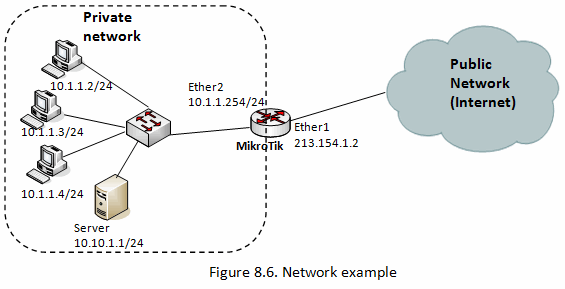
[admin@MikroTik] /queue simple> add name=private target=10.1.1.0/24 max-limit=256K/512K \
interface=ether2
- In this case statement works right also if we indicate only one of parameters: "target=" or "interface=", because both of these define where and for which traffic this queue will be implemented.
Check your configuration :
[admin@Augsha] /queue simple> print

Flags: X - disabled, I - invalid, D - dynamic
 0    name="private" target=10.1.1.0/24 dst-address=0.0.0.0/0
      interface=ether2 parent=none direction=both priority=8
      queue=default-small/default-small limit-at=0/0 max-limit=256k/512k
      burst-limit=0/0 burst-threshold=0/0 burst-time=0s/0s
      total-queue=default-small
The max-limit parameter cuts down the maximum available bandwidth. The value max-limit=256k/512k means that clients from private network will get maximum of 512kbps for download and 256kbps for upload. The target allows to define the source IP addresses to which the queue rule will be applied.
Probably, you want to exclude the server from being limited, if so, add a queue for it without any limitation (max-limit=0/0 which means no limitation). Move this rule to the beginning of the list, because items in /queue simple are executed in order one by one if router finds rule that satisfy certain packet next rules aren’t compared:
[admin@MikroTik] /queue simple> add name=server target=10.1.1.1/32 max-limit=0/0 \
interface=ether2
Monday, February 26, 2018
Temp File
Linux :
https://drive.google.com/open?id=1vtqTLiu7eZnBuCEvZUSN8DVv3FKikUWw
Windows :
https://drive.google.com/file/d/1-QGl220CBdGUxzNbKpm-RXLi4NuPc8qP/view?usp=sharing
https://drive.google.com/open?id=1vtqTLiu7eZnBuCEvZUSN8DVv3FKikUWw
Windows :
https://drive.google.com/file/d/1-QGl220CBdGUxzNbKpm-RXLi4NuPc8qP/view?usp=sharing
Subscribe to:
Posts (Atom)